Your camera has a meter that is calibrated to middle gray, which is defined as a centered histogram spike, 18 percent gray, or in some cases 12 percent gray. However, there is no need to get caught up in the calibration percentage. The meter has three modes: Spot, center-weighted, and average or matrix.
Spot mode samples a tiny spot and disregards the rest of the scene, center-weighted mode biases the center as more important, but takes the background into consideration to some extent, and average or matrix mode looks at numerous spots in the whole scene and uses an averaging protocol to try and determine the best exposure. The problem with any metering system is that in split light or scenes that are all very bright or all very dark, the meter can get the exposure “wrong.”
The meter has no idea what you are pointing the camera at and only tests the level of light reflecting off an object. White reflects 90 percent, gray reflects 50 percent, and black reflects 30 percent of the light that hits it. The camera can only set one exposure, which is why it can get snow or a black tux “wrong.”
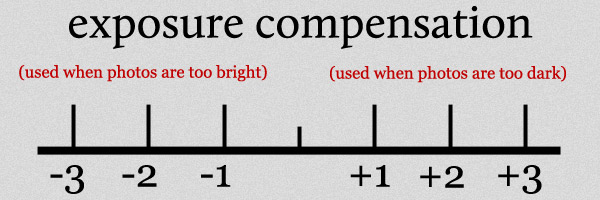
To correct this, you must use exposure compensation to over-expose bright tones and under-expose dark tones. In manual mode, you can do this by setting the meter to + or – on bright or dark tones. In TTL mode, you must dial in exposure compensation to achieve the desired result. The same issues exist with flash if it is in TTL mode, and you must also dial in flash exposure compensation.
One of the biggest challenges to the meter is placing the subject in one light source and having bright light in the background. If the camera sets exposure for the subject, the background is over-exposed, and if it sets exposure for the background, the subject is under-exposed. Understanding this allows you to control both parts of the image. In even light, setting exposure for the subject effectively sets it for the background.
Understanding your camera’s meter and using it correctly can greatly improve your exposures and lead to better images.
 The Inquisitive Journal